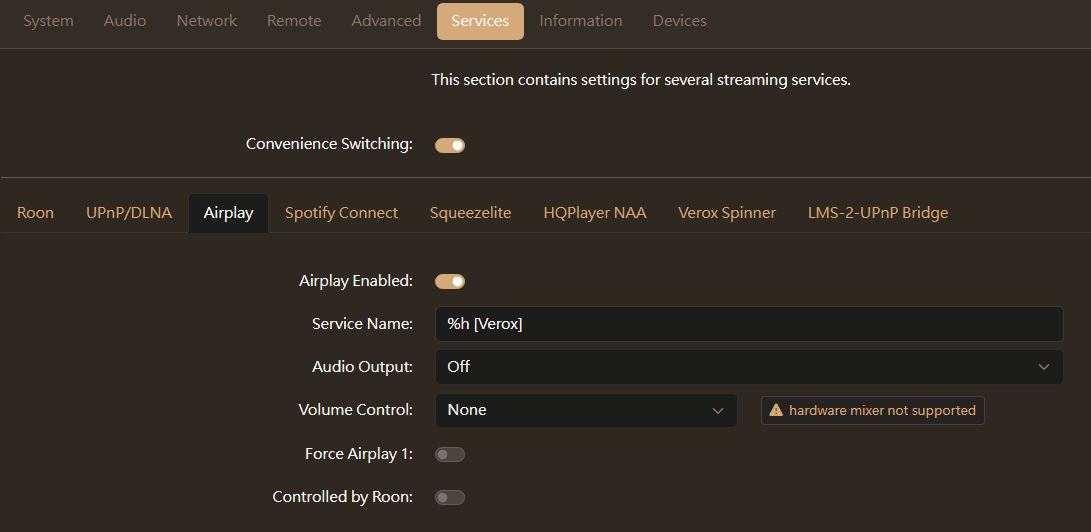
I’m having an issue with HiFiBerry Digi+ detection on my Raspberry Pi 4 Model B running Verox 2026.09.1 (4121).
My setup:
Raspberry Pi 4 Model B (4GB RAM)
HiFiBerry Digi+
Verox 2026.09.1 (4121)
Kernel 6.1.854-SPCKFSH
The HAT type is correctly set to HiFiBerry Digi+, but the Audio Output menu only shows Off. The expected output, HAT: HifiBerry Digi HiFi wm8804-spdif-0, does not appear.
I tested the same HiFiBerry Digi+ HAT on my Raspberry Pi 3 Model B+ running the same Verox version, and it works correctly. I also tested the Pi 4 with the same Ethernet cable, but the issue remained.
I have previously submitted the following feedback reports related to this issue:
ea0969204e7f99c0
I noticed the latest beta mentions an updated AirPlay component and a kernel update. Could either change be relevant to this issue? Is there a recommended beta or earlier stable version I could test without switching to another operating system?
I would appreciate any advice on how to diagnose this.
Bug Report: HiFiBerry Digi+ Not Detected on Initial Boot – Raspberry Pi 4B (Verox 2026.10 Beta Build 4232)
Hello Verox Development Team,
I would like to report a hardware detection issue when using Verox 2026.10 Beta build 4232 on my Raspberry Pi 4B with a HiFiBerry Digi+ HAT.
Hardware and Software Configuration
Board: Raspberry Pi 4B (4GB RAM)
Audio HAT: HiFiBerry Digi+
Working Version: Verox 2026.10 Beta build 4149
Test Version: Verox 2026.10 Beta build 4232
Kernel: 6.18.59-SPCKFSH (build 4232)
Audio Device: WM8804 S/PDIF (wm8804-spdif-0)
Receiver: WiiM Ultra (Optical Input)
Issue: HiFiBerry Digi+ Not Detected on Initial Boot
When I first booted the Raspberry Pi 4B using the SD card containing Verox 2026.10 Beta build 4232, the system failed to detect the HiFiBerry Digi+.
However, I discovered a workaround using two separate SD cards:
Insert the SD card containing Verox build 4149 and boot the Raspberry Pi.
The HiFiBerry Digi+ is detected correctly.
Shut down the Raspberry Pi, remove the SD card, and replace it with the separate SD card containing Verox build 4232.
Boot the Raspberry Pi again using the build 4232 SD card.
The HiFiBerry Digi+ is now detected successfully and appears as wm8804-spdif-0.
Both versions are installed on separate SD cards. No system upgrade or reinstallation is performed during this process.
AirPlay Playback After the Workaround
After applying the workaround described above, the HiFiBerry Digi+ is successfully detected on build 4232, and AirPlay playback works normally.
I tested AirPlay using both a Windows PC and an iPhone. Both devices can successfully transmit audio through the Raspberry Pi’s optical output to the WiiM Ultra.
This confirms that AirPlay itself works correctly once the HiFiBerry Digi+ has been successfully detected and initialized.
Comparison with Build 4149
Using the same Raspberry Pi 4B and HiFiBerry Digi+ hardware configuration:
Build 4149: HiFiBerry Digi+ is detected normally, and AirPlay works correctly.
Build 4232: HiFiBerry Digi+ is not detected on the initial boot. However, after booting with build 4149 and then switching to the separate SD card containing build 4232, the audio device is detected successfully and AirPlay works normally.
Questions for the Development Team
Is there a known issue with HiFiBerry Digi+ detection during the initial boot of build 4232?
Could this behavior be related to the WM8804 driver, ALSA configuration, or audio device initialization?
Is there a way to resolve this issue so that HiFiBerry Digi+ can be detected correctly on the first boot without requiring this workaround?
I would appreciate it if the development team could investigate this issue.
Thanks Tom, that’s a very clear report! I checked: between 4149 and 4232 nothing changed in the WM8804 driver, the HiFiBerry driver or its overlay. Your workaround is a useful clue though. When a Pi 4 shuts down, the HAT stays powered, so it looks like the Digi+ sometimes doesn’t initialise from a cold start, and once it has been set up it keeps working.
Two things would help me narrow it down, both on the 4232 card (or update to the latest beta, 4251, first):
Cold start: unplug the power for about 10 seconds, plug it back in and let it boot. If the Digi+ isn’t detected, send feedback right away (Advanced → Send feedback) and post the code here.
Then do a normal reboot from the web interface, without changing cards. Is the Digi+ detected after that?
I have completed some additional tests on Stable 2026.9.1 (Build 4121).
Here are the results:
Test 1 – Cold start on Stable 4121
Disconnected power for approximately 10 seconds before restarting.
No Audio HAT settings were changed.
wm8804-spdif-0 was not listed under Services → AirPlay → Audio Output. Only OFF was displayed.
Feedback code: 059fe5bc6a21d4f7
Test 2 – Booting Beta 4149 first, then switching back to Stable 4121
Booted with the 4149 SD card, and wm8804-spdif-0 was detected successfully.
Shut down normally and switched back to the 4121 SD card.
After booting 4121, wm8804-spdif-0 was still missing. Only OFF was displayed.
Test 3 – Another cold start on Stable 4121
Shut down normally, disconnected power for approximately 10 seconds, and powered it on again.
wm8804-spdif-0 was still not detected. Only OFF was displayed.
The results are consistent: Beta 4149 detects the HiFiBerry Digi+ normally, while Stable 4121 does not detect it, even after booting 4149 first.
Could you please check the system logs associated with feedback code 059fe5bc6a21d4f7 and see if there is any indication of why the Digi+ is not detected on Stable 4121?
Thanks Tom, those two reports solved it! It isn’t a detection failure after all, and my cold-start theory was wrong. Verox needs to be told which HAT is fitted: you select it under Audio HAT, as you did. Some HATs carry an ID chip, and for those Verox fills this in automatically on first boot. The Digi+ doesn’t have one, so on a freshly flashed card it starts with no HAT selected. That’s why your 4149 card worked: the Digi+ was selected there, while the 4121 and 4232 cards didn’t have it set yet. The setting is kept through updates, so you only need to select it again after flashing a new card.
Thank you, Harry. I went back and reviewed my earlier test records from October, and noticed something that might be worth mentioning.
On October 13–14, I tested the same HiFiBerry Digi+ HAT on both a Raspberry Pi 3B+ and a Raspberry Pi 4B, with both devices running Verox Stable 2026.9.1 (Build 4121).
The Raspberry Pi 3B+ correctly detected the HAT and showed wm8804-spdif-0.
However, on the Raspberry Pi 4B, even though I had manually selected HiFiBerry Digi+ under the Audio HAT settings, AirPlay Audio Output still showed only OFF.
During those two days, I also repeatedly swapped the same HAT between the two Raspberry Pi boards for testing. The Digi+ worked properly with the Pi 4B under Volumio, so the HAT itself appeared to be working correctly.
This suggests that the issue I encountered back then may not have been simply due to the HAT not being selected. There might have been another initialization or compatibility issue specific to the Pi 4B in the earlier Verox version.
I just wanted to share these details from my old test records for your reference. Since the Digi+ is now working properly on my Pi 4B, I’m happy with the current result. If everything is working as expected now, there’s no need to spend extra time investigating the earlier behavior.