Recently upgraded to Verox from RoPieee - fabulous software thanks! In testing I have noticed a couple of issues with Spotify:
Hardware / software
- Raspberry Pi 4 Model B Rev 1.5
- USB audio to AudioQuest DragonFly Cobalt v1
- Verox 2026.10 (4219) BETA
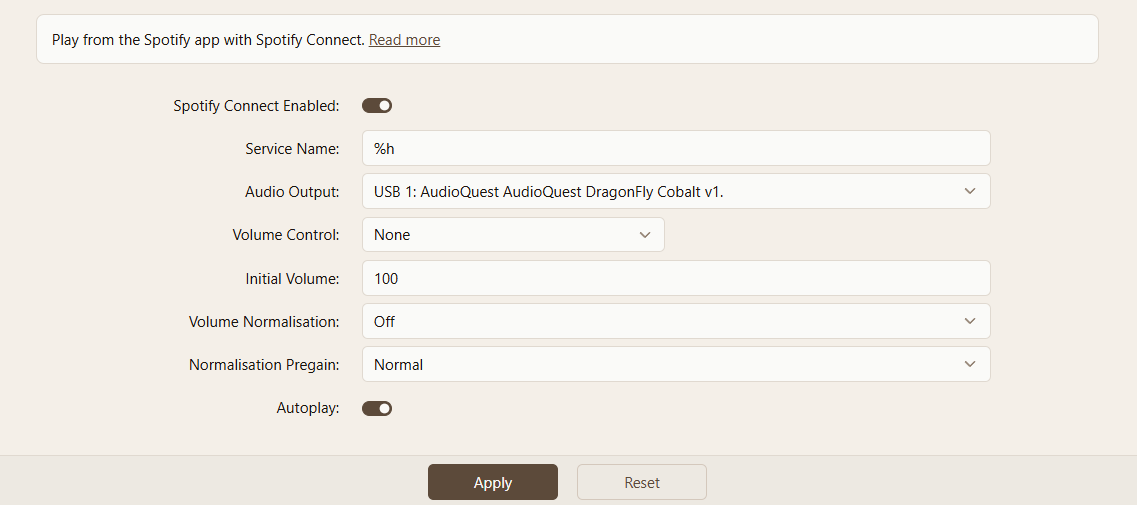
Issue 1 - No Spotify Connect. When Spotify Connect is selected, there is no audio, and the spotify app play/pause controls become unresponsive on the controlling device, and the audio track progress bar either stalls, or continually tries to load. This occurs via both IOS and android devices. Also, when I try to play a track from my Windows PC I get the same behavior but with the additional pop-up message “Spotify can’t play this right now. If you have the file on your computer you can import it.” Maybe I’m just missing something obvious in my settings?
Issue 2 - Switching between Plex and Spotify Soloist. In contrast to Spotify Connect, both Plex and Spotify Soloist are (individually) working just fine. If I’m playing a track on Plexamp, pause it, then switch to the Spotify app and start a track there, it all works good. Similarly if a track is playing on Spotify, and I pause it, then start a track on Plexamp it all works fine. I can therefore continue to switch between the Plexamp and Spotify apps in this way.
However, if I start a track playing in Spotify whilst one is already playing in Plex, Spotify will take over and start playing as expected (with ‘Convenience switching’ enabled). But if I then switch back to Plex whilst the Spotify track is playing, start the Plex track, then switch back to Spotify again (for the second time), the track shows as playing in the Spotify app (i.e. the progress bar is advancing) but there is no audio. In other words, any subsequent switching to back to Spotify after the first switch leads to no audio output. The only way I’ve found to fix it is to trigger a ‘CONFIGUE’ in the Verox web app. Interesting, the same loss of Spotify audio, when switching whilst a track is already playing, occurs irrespective of whether ‘Convenience switching’ is enabled or not.
Plex seems rock-solid, with no issues at all.
Hope this is of some use